
GPT Image 2.5 vs Seedream 5.0 Pro looks close on a feature sheet, but four identical production briefs exposed a clear difference between them.
In my tests, GPT Image 2.5 was faster and followed the brief more literally in all four tasks. Seedream 5.0 Pro produced the more visually polished result in three of four, with its clearest advantage in photorealistic rendering.
GPT Image 2.5 averaged 28.6 seconds per image against Seedream 5.0 Pro’s 60.2 seconds. On the platform used for this test, GPT Image 2.5 also cost 1 credit per 1K image versus 2 credits for Seedream 5.0 Pro.
The four briefs covered an information-dense infographic, a precise product recolor, a photorealistic campaign image, and a bilingual poster. Both models used the same prompt, the same aspect ratio and the same 1K resolution tier wherever possible.
That makes this less a question of which model is universally “better” and more a question of what kind of control your workflow needs — instruction adherence on one side, aesthetics on the other.
Run these four briefs yourself in GPT Image 2.5
GPT Image 2.5 vs Seedream 5.0 Pro: Quick Comparison
Area | GPT Image 2.5 | Seedream 5.0 Pro | Better fit |
|---|---|---|---|
Average generation time (4 briefs) | 28.6 s | 60.2 s | GPT Image 2.5 |
Cost per image (1K tier) | 1 credit | 2 credits | GPT Image 2.5 |
Following the brief literally | Held the brief in all 4 | Drifted on 3 of 4 | GPT Image 2.5 |
Raw photorealism | Strong | Stronger | Seedream 5.0 Pro |
Information structure in charts | Built all 4 requested structures | Decorative but thinner | GPT Image 2.5 |
Bilingual text accuracy | Clean in both languages | One katakana error, added unrequested text | GPT Image 2.5 |
Precise region editing | Prompt-based | Point, box, lasso, sketch | Seedream 5.0 Pro |
Layer separation | No comparable documented feature | Native | Seedream 5.0 Pro |
Multi-image fusion | Reference images supported | Explicit fusion workflow | Seedream 5.0 Pro |
Aspect ratios | 15, including 4:5 | 9, no 4:5 | GPT Image 2.5 |
Resolution tiers | 1K / 2K / 4K | 1K / 2K | GPT Image 2.5 |
Reference images | up to 16 | up to 10 | GPT Image 2.5 |
Transparent PNG output | Did not produce an alpha channel in testing | Layer workflow can carry transparency | See the section below |
The pattern underneath that table is a difference in philosophy.
GPT Image 2.5 is built around “change this, preserve everything else.” Seedream 5.0 Pro is built around “here is exactly where the change happens, and here is how the design is structured.”
Neither is automatically better. They are optimized around different definitions of control.
GPT Image 2.5 vs Seedream 5.0 Pro: What Each Model Is
What is GPT Image 2.5?
GPT Image 2.5 is OpenAI’s current image generation and editing family, released on September 8, 2026. It emphasizes faster generation, stronger reference-image fidelity, and keeping earlier changes intact across multiple editing turns.
It ships in two variants: Flare for fast everyday generation and Sunburst for work where editing precision matters more than speed. Our GPT Image 2.5 review compares the two directly. All four head-to-head briefs in this comparison were generated on Flare.
What is Seedream 5.0 Pro?
Seedream 5.0 Pro is ByteDance Seed’s multimodal image model, released in July 2026 and aimed at professional visual production.
Its documented feature set is design-oriented: high-density information visualization, spatially targeted editing through point, box and lasso selection, sketch input, material and color replacement, separation of a composition into editable layers, multi-image fusion, and multilingual text across more than ten languages.
How We Tested GPT Image 2.5 vs Seedream 5.0 Pro
Every image was generated at the 1K resolution tier. GPT Image 2.5 ran on Flare at Medium quality. Seedream 5.0 Pro exposes no quality slider, so it ran at its default.
Where the two models offered different aspect ratios, I used a ratio both support — which brings up the first hard difference.
GPT Image 2.5 exposes 15 aspect ratios. Seedream 5.0 Pro exposes 9, and 4:5 is not among them. 4:5 is a common portrait format for paid social and marketplace product imagery. Two of my four briefs were written for 4:5; I ran them at 3:4 on both models so the comparison stayed fair. If 4:5 is where your work ships, that constraint decides the question before anything else in this article matters.
Test 1 — The infographic
A 16:9 infographic on the carbon cost of commuting, split into four separated sections: a transport comparison bar chart, a five-step decision flowchart, a small city map, and a checklist. Readable English labels, muted palette, generous margins, no invented statistics.
GPT Image 2.5: 29.2 s | Seedream 5.0 Pro: 65.7 s |
|---|---|
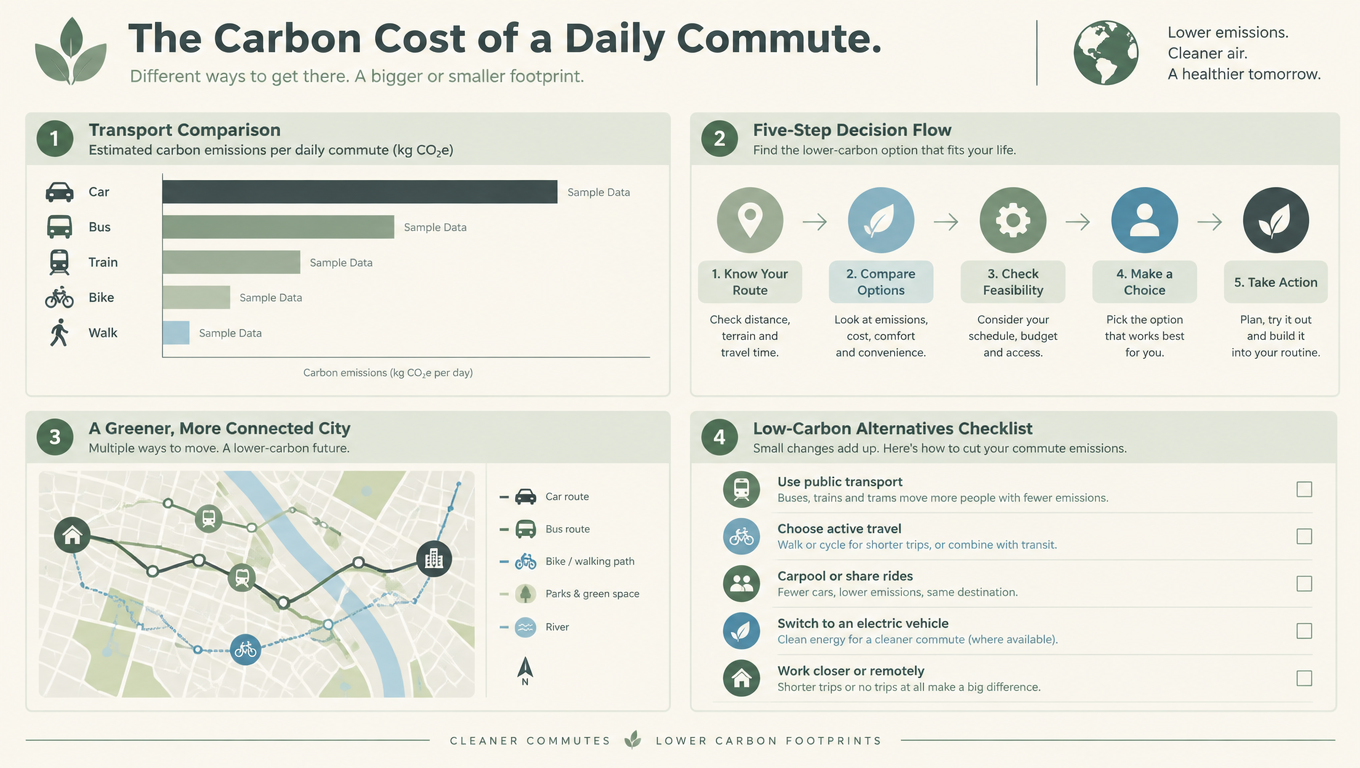 | 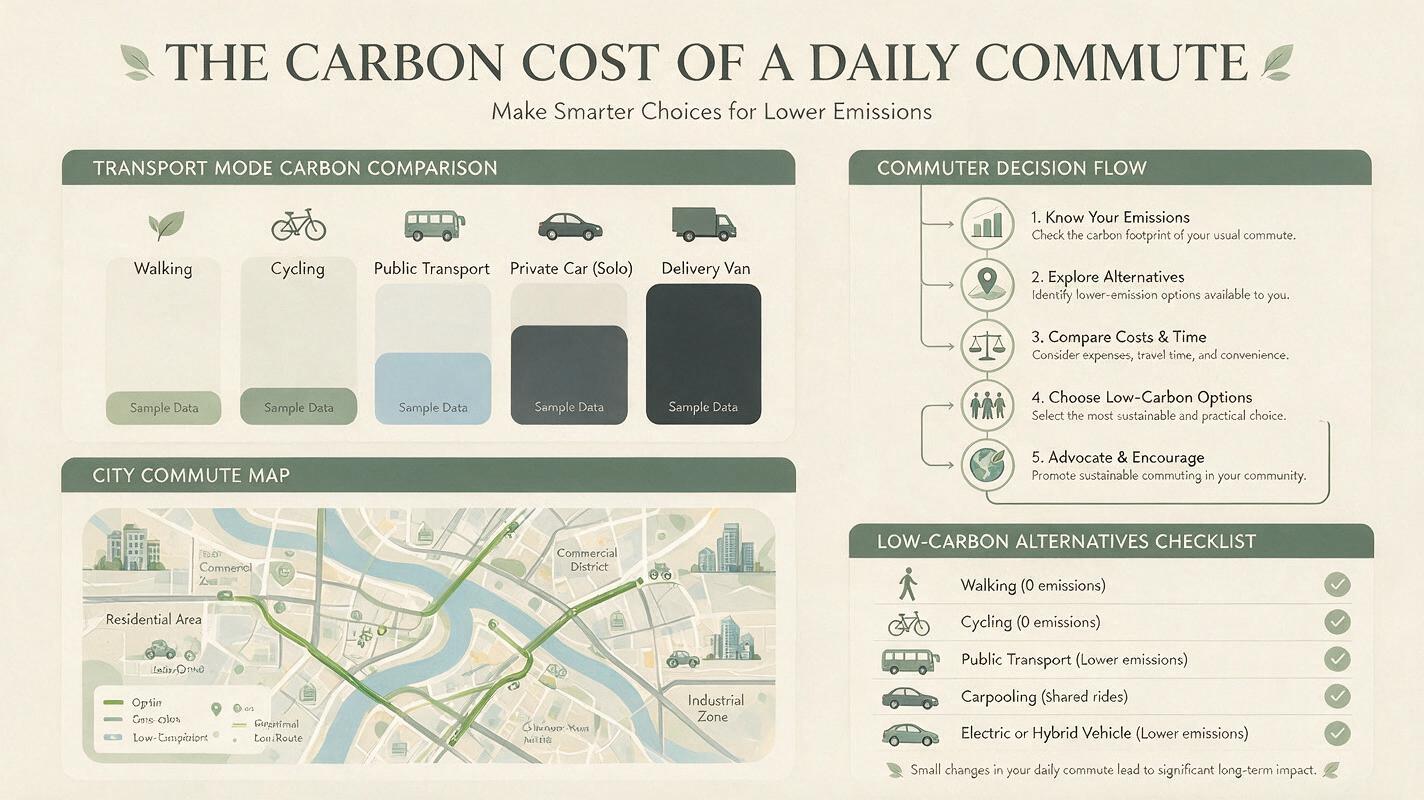 |
GPT Image 2.5 took this one on information structure, and lost it on looks.
Seedream produced the more handsome object — a serif all-caps headline with leaf flourishes, cleanly ruled section headers, something that reads like a printed report cover. Shown side by side for one second, many people would point at it.
But the brief asked for four specific information structures. GPT Image 2.5 delivered an actual bar chart with a labeled row per transport mode, an actual five-step flow with connecting arrows, a map with a marked route, and a checklist with real checkboxes. Seedream’s comparison is a row of largely empty gray blocks, and its “decision flow” is a numbered text list rather than a flowchart.
This is worth noting precisely because dense infographics are Seedream’s headline specialization. On this single brief, the model with the documented specialization produced the prettier layout and the weaker information graphic.
Test 2 — The product recolor
The precision-editing test. I generated a brushed-silver espresso machine on a wooden counter as a shared source image, then gave that same file to both models with one instruction: change only the body to matte forest green, preserve the emblem, buttons, steam wand, reflections, counter, shadows, camera angle and background, and do not alter proportions.
Original | GPT Image 2.5: 31.6 s | Seedream 5.0 Pro: 41.7 s |
|---|---|---|
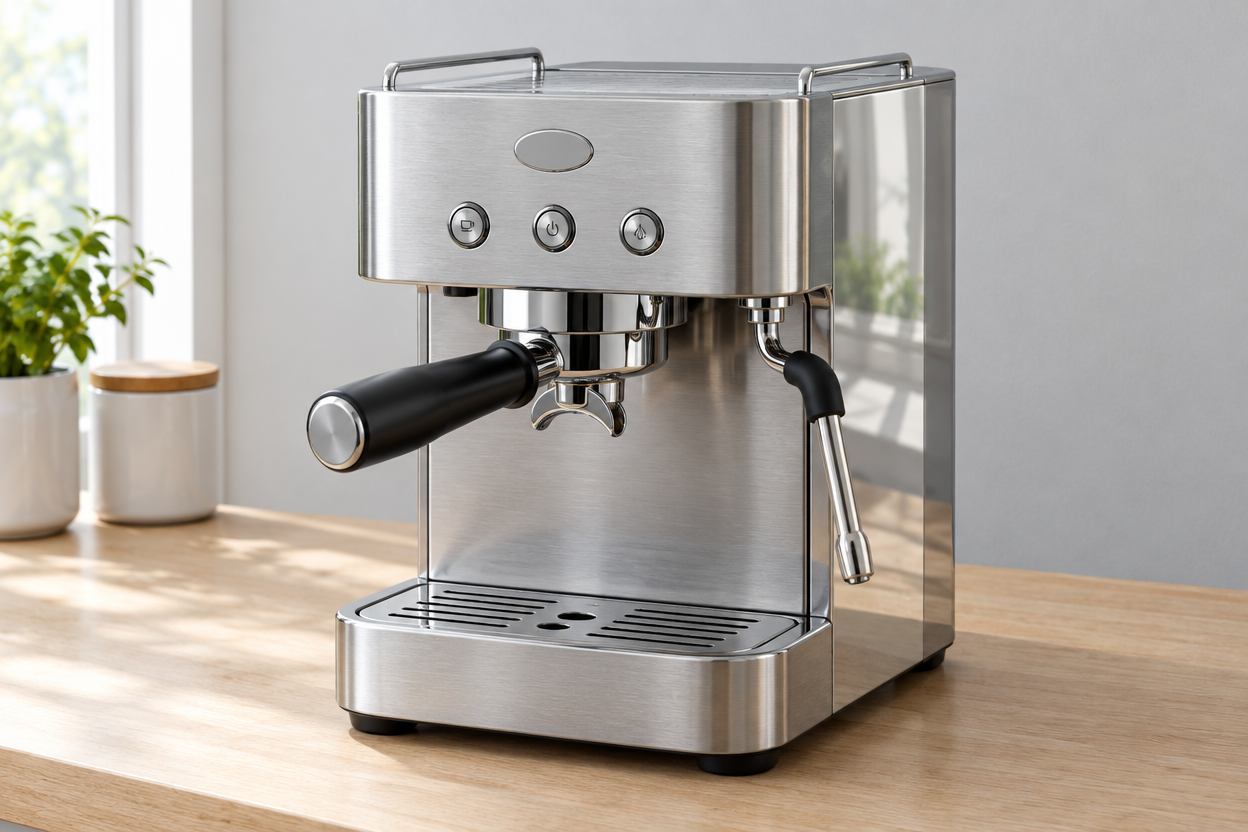 | 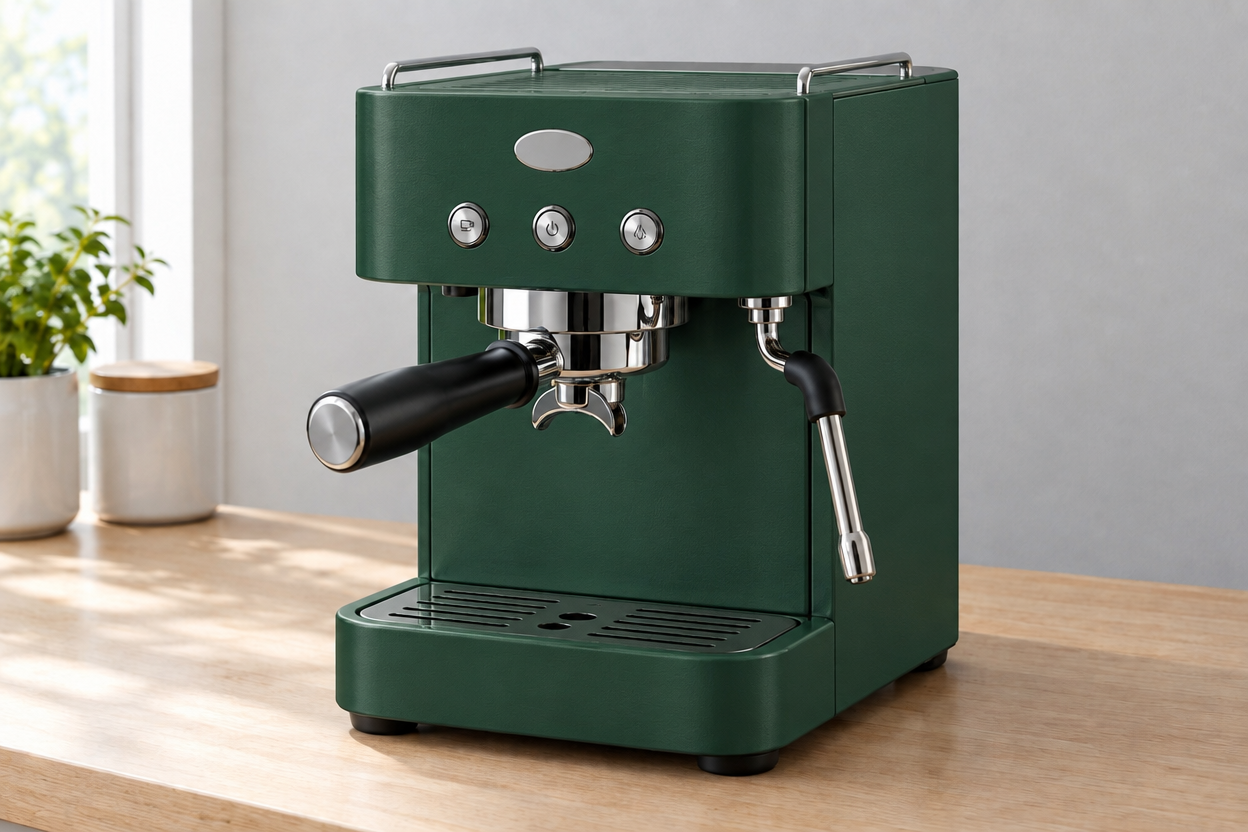 | 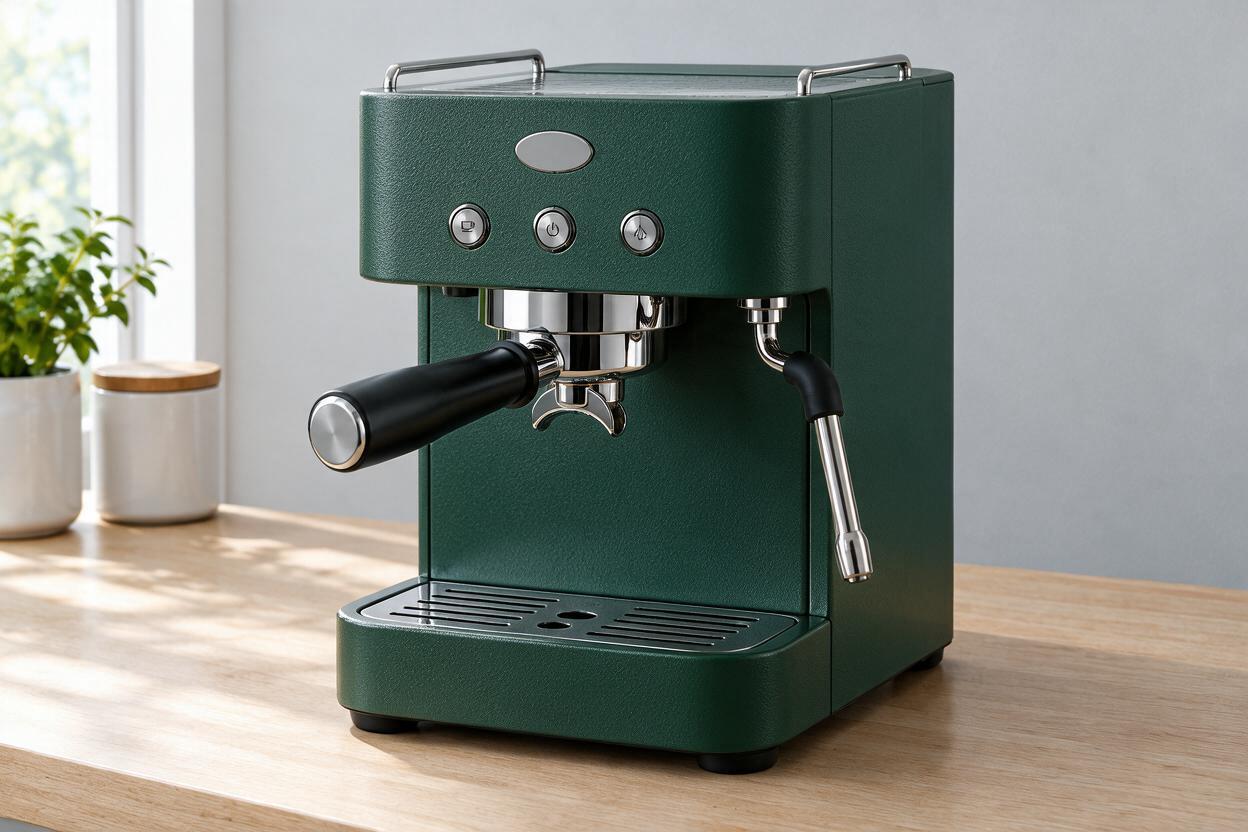 |
Both got the color right, and — importantly — both left the chrome and black components alone rather than flooding the whole machine green. That is the failure this brief is built to catch, and neither fell into it.
The difference is in everything the brief asked to keep. Put the three frames side by side: GPT Image 2.5’s output sits almost exactly on top of the original — same framing, same position in frame, same counter edge, same plants at the same distance. Seedream’s machine is subtly re-rendered: shifted in frame, slightly different proportions, a redrawn drip tray.
Neither is a bad image. But “change only this” means the parts you did not mention should survive untouched, and on this run GPT Image 2.5 held the original more tightly.
Try the same recolor on your own product shot
Test 3 — The photorealistic campaign frame
A frosted glass serum bottle on pale limestone beside a shallow pool. Late-afternoon light from the left, caustic reflections, condensation on the glass, brushed aluminum cap, restrained beige-and-sage palette, clean negative space reserved in the upper right for copy.
GPT Image 2.5: 22.2 s | Seedream 5.0 Pro: 50.6 s |
|---|---|
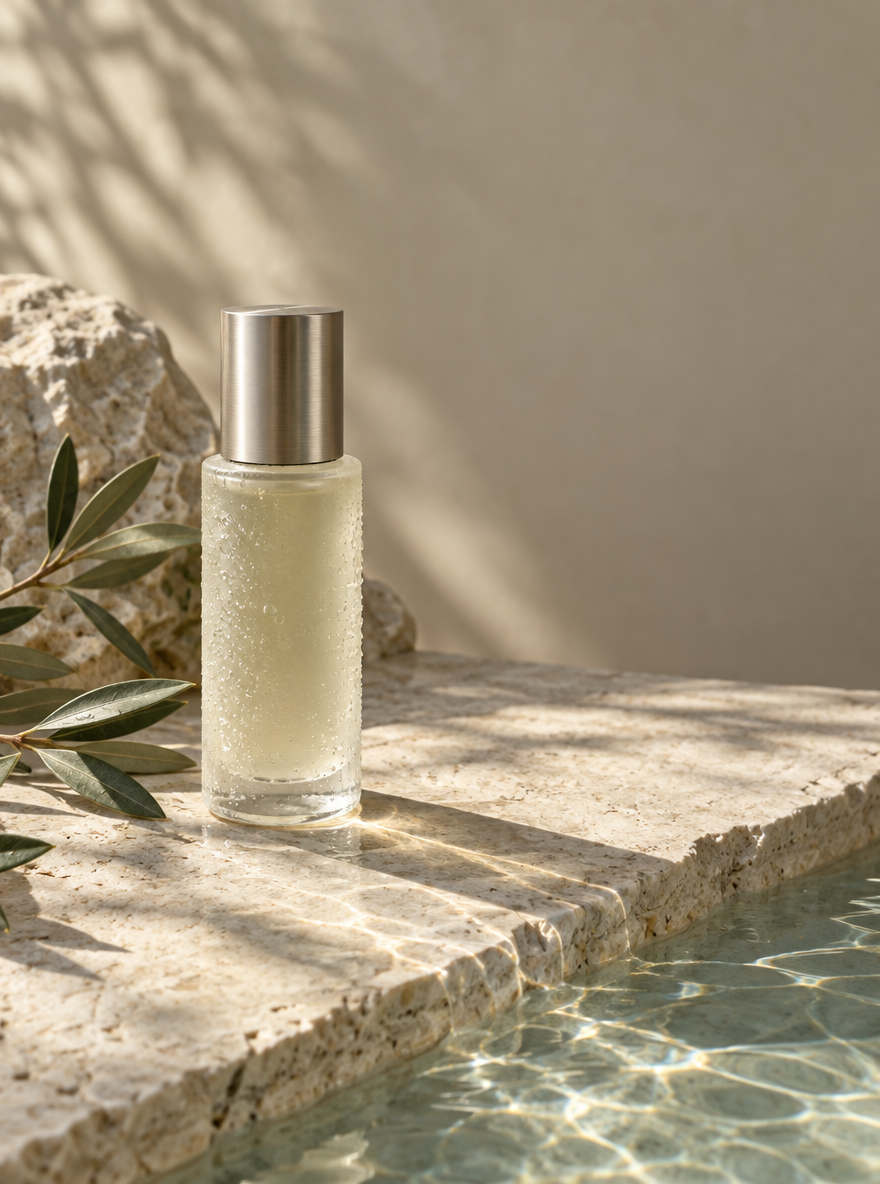 | 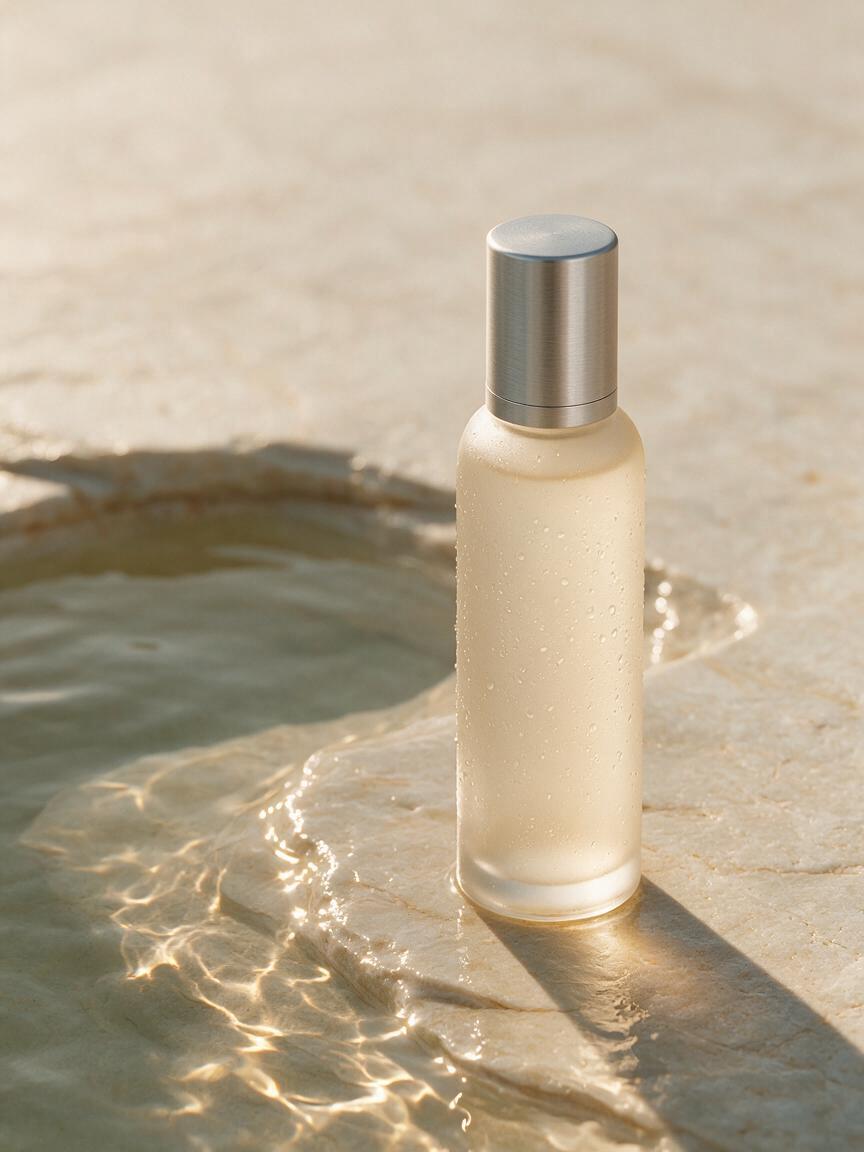 |
On rendering quality, this was Seedream 5.0 Pro’s strongest showing across the four briefs.
Seedream’s water is simply better. The caustics ripple across the stone with a convincing falloff, the pool reads as having depth, and the frosted glass has a weight the other frame does not quite reach. As a hero image you could put in a deck without apologizing, it is the stronger picture. In this run, the visual gap was large enough to make Seedream 5.0 Pro the clear choice on photorealism.
What it did not do is follow the brief. The upper right, explicitly reserved for copy, is filled with stone and water texture, so an art director would have to crop or re-run. GPT Image 2.5 kept that corner clean, put the light where the brief said, and included the olive foliage and its cast shadow.
Seedream made the better photograph. GPT Image 2.5 made the more usable layout. If your next step is “drop headline text on this,” that decides it. If your next step is “ship this as-is,” it goes the other way.
Test 4 — The bilingual poster
A vertical café poster with an English headline, a matching Japanese headline, three short offer lines as translation pairs, a specified palette, one drink photograph, a small calendar block, an empty QR area, and explicitly no extra words.
GPT Image 2.5: 31.3 s | Seedream 5.0 Pro: 82.6 s |
|---|---|
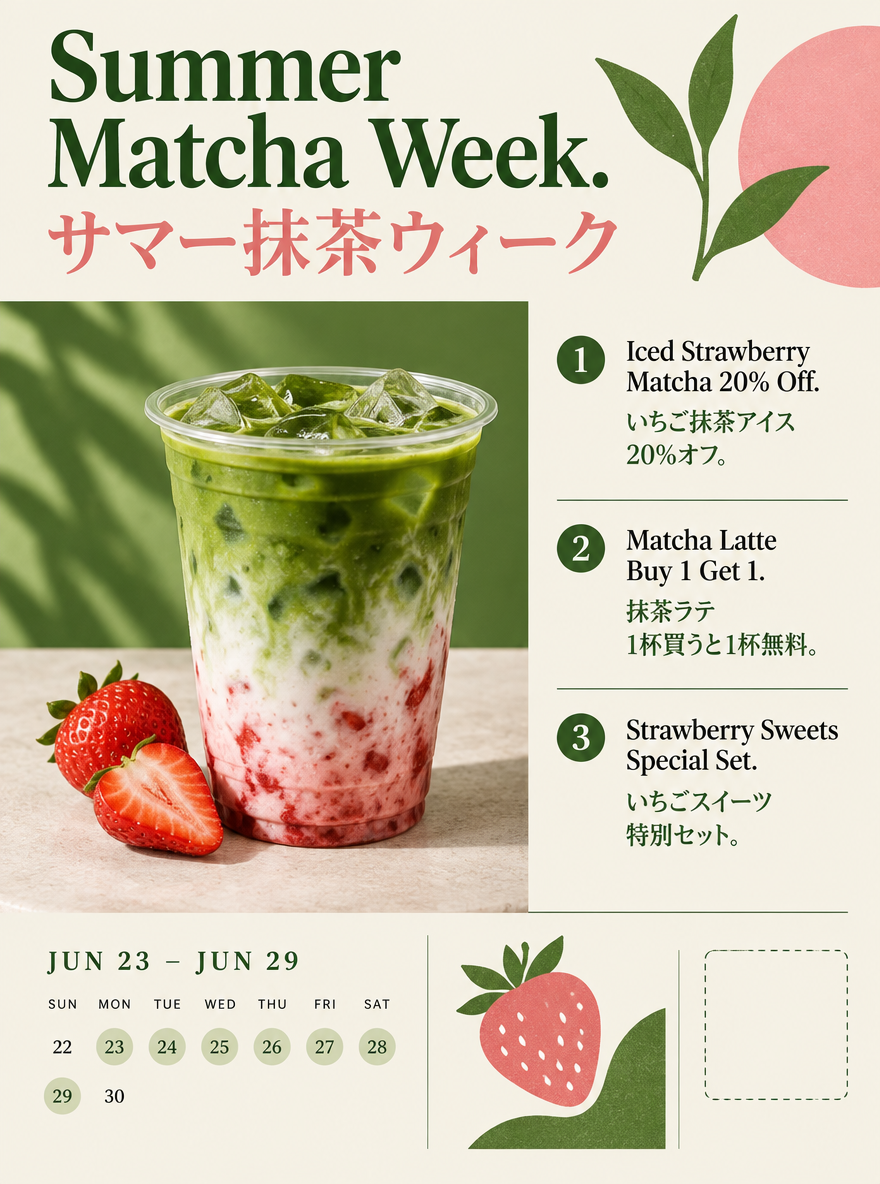 | 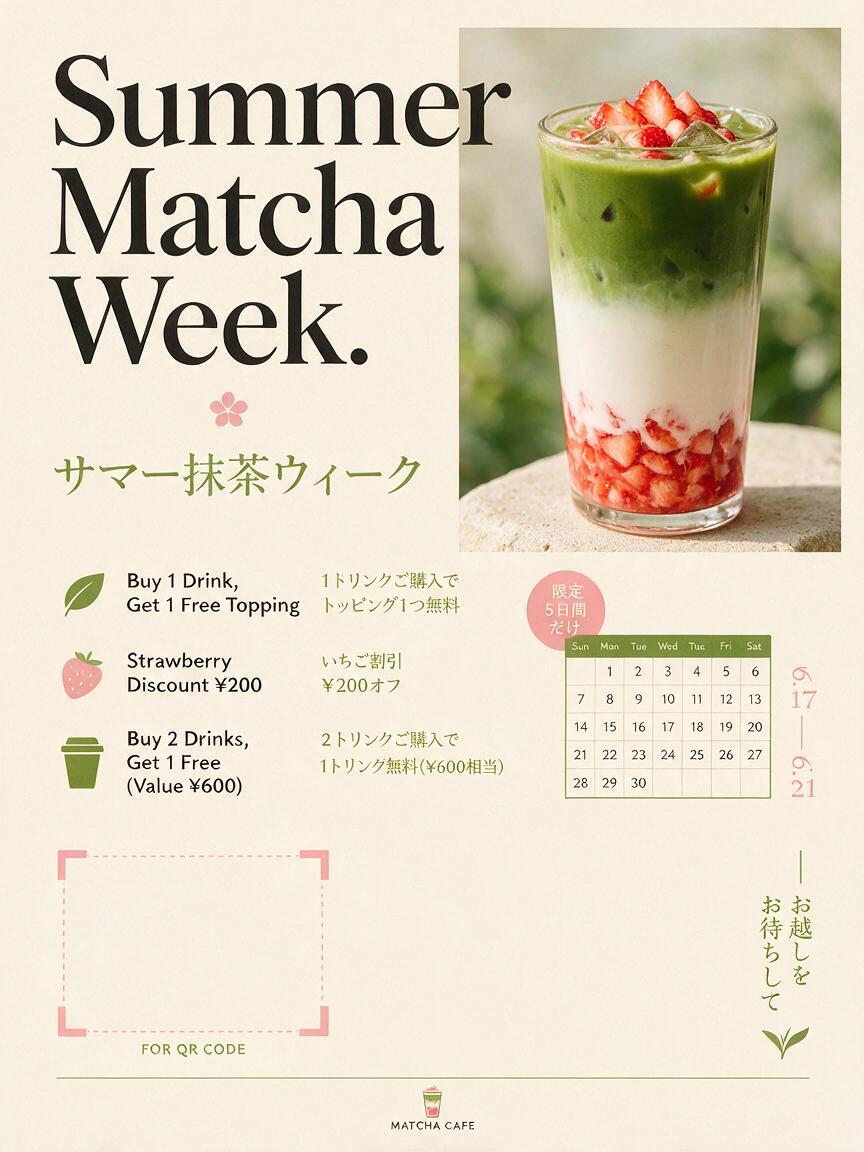 |
Both rendered the English headline correctly and both produced a correct Japanese headline — already more than this brief would have survived a generation ago.
The separation is in the details. As far as is legible at 1K output, GPT Image 2.5’s three offer pairs are clean in both languages, and its calendar block is internally coherent: a stated date range with a weekday grid underneath that actually lines up. Seedream’s Japanese carries at least one katakana error in the third offer line, where the word for “topping” comes out malformed.
Seedream also added a small café wordmark at the bottom. Nobody asked for it, and the brief said not to add extra words — the same class of problem as the reserved space in Test 3.
Against that, Seedream’s poster is the better-looking one. The oversized serif headline and generous whitespace are a more confident piece of design than the tidier, busier layout beside it.
GPT Image 2.5 vs Seedream 5.0 Pro: The Scoreboard
Brief | Faster | More on-brief | Better looking |
|---|---|---|---|
Infographic | GPT Image 2.5 | GPT Image 2.5 | Seedream 5.0 Pro |
Product recolor | GPT Image 2.5 | GPT Image 2.5 | tie |
Skincare campaign | GPT Image 2.5 | GPT Image 2.5 | Seedream 5.0 Pro |
Bilingual poster | GPT Image 2.5 | GPT Image 2.5 | Seedream 5.0 Pro |
GPT Image 2.5 followed instructions more literally in all four briefs and was faster in all four. Seedream 5.0 Pro produced the more attractive image in three, and in the skincare test the rendering gap was decisive.
One model is better at doing what you said. The other is better at making something you want to look at.
Brief | Ratio | GPT Image 2.5 | Seedream 5.0 Pro |
|---|---|---|---|
Infographic | 16:9 | 29.2 s | 65.7 s |
Product recolor | 3:2 | 31.6 s | 41.7 s |
Skincare campaign | 3:4 | 22.2 s | 50.6 s |
Bilingual poster | 3:4 | 31.3 s | 82.6 s |
Average | 28.6 s | 60.2 s | |
Credits per image | 1 | 2 |
Four images cost 4 credits and just under two minutes on GPT Image 2.5; 8 credits and just over four minutes on Seedream 5.0 Pro. That ratio matters more than it looks, because neither model gets a brief right first time every time. At three attempts you are comparing 12 credits against 24. Iteration cost is where a 2× per-image price actually lands.
Transparent backgrounds: check the file, not the preview
This deserves its own section, because it is the one place where the documentation and the output did not agree in my testing.
OpenAI’s help documentation describes asking the image system for a transparent background as a supported workflow. So I tested it three ways: text-to-image on Flare, text-to-image on Sunburst, and an edit-mode background removal — each with a prompt that explicitly demanded a real alpha channel and explicitly forbade a white fill or a checkerboard pattern.
All three came back as PNGs with no alpha channel at all.
The technical reading was identical across the three files: PNG IHDR color type 2 (truecolor RGB), 8-bit depth, no tRNS chunk, minimum alpha value of 255 across all 1,048,576 pixels, and 0.00% transparent pixels.
The Flare run returned a white background. Both other runs did something more troublesome: the model painted a checkerboard pattern — the familiar gray-and-white transparency placeholder — as opaque pixels. On screen those files look exactly like a cut-out. Drop them into a layout and you get a product sitting on a painted checkerboard.
The practical lesson is the same whichever model you use, and it is worth more than any feature table: verify the file, not the preview. Open the PNG and confirm it actually carries an alpha channel before you treat it as a cut-out asset. A file that looks transparent in a browser tab is not evidence that it is.
I tested through one interface, so I cannot separate the model’s output from the delivery pipeline from the outside. Run the check on your own output before planning a workflow around transparent assets.
Seedream 5.0 Pro approaches this from a different direction: its layer-separation workflow can produce separated elements that carry transparency. That is a different job — decomposing a finished design rather than cutting out a single subject.
Layer separation and multi-image fusion
Two Seedream capabilities have no direct equivalent in GPT Image 2.5’s documented feature set, and I did not test either — they are outside what four generation briefs can measure. Flagging them because they may matter more to your workflow than anything above.
Layer separation. ByteDance demonstrates a finished poster divided into more than ten independent elements — text, subject, background, decorative objects — with areas hidden behind foreground elements reconstructed so components can be moved or resized separately. For designers who want AI output closer to an editable asset than a flattened image, this is Seedream’s clearest structural advantage.
Multi-image fusion. Seedream’s documented workflow takes several source images and combines their elements into one composition, including extracting people from separate photographs into a single group shot with matched lighting.
GPT Image 2.5 supports reference images — up to 16 — and emphasizes preserving a subject’s identity across edits. That is a different strength: one subject that has to survive repeated changes, rather than several sources merged into one frame.
API and pricing
GPT Image 2.5 has a clear published rate card. Per OpenAI’s model documentation, Flare and Sunburst are priced identically:
Per 1M tokens | |
|---|---|
Text input | $5.00 (cached $1.25) |
Image input | $8.00 (cached $2.00) |
Image output | $30.00 |
Text output is not billed, because the model outputs images rather than text. The cost of a finished image therefore depends on token consumption and quality setting, not a flat per-image price — which is why Sunburst can cost more per image in practice despite identical rates, since it tends to be used at higher quality.
Seedream 5.0 Pro is harder to compare cleanly, because access and pricing vary by platform and provider. Treat any table claiming “$X per image” for both models with suspicion unless both numbers were measured through the same provider at the same resolution and settings. The 1 credit versus 2 credit figure in this article is one platform’s pricing at the 1K tier, not a universal exchange rate.
GPT Image 2.5 vs Seedream 5.0 Pro: Which Should You Use?
Use GPT Image 2.5 when the brief has rules. Reserved space for copy, a product that must not change shape, text that has to be spelled correctly in two languages, a layout with four required sections — anything where “you changed something I did not ask you to change” is a failed output. It is also the one to reach for when you will iterate, because at one credit and under thirty seconds you can afford to be wrong twice.
Use Seedream 5.0 Pro when the brief is a look, or when the image is a design document. Glass, water, light, materials, atmosphere — the skincare test was not close. The same applies to layer-oriented work, multi-source composition, and region-based editing through points and lassos.
Check your aspect ratio before you commit. If your output is 4:5, Seedream 5.0 Pro does not offer it.
Many designers will use both: build a layered or multilingual composition in one, then iterate variations in the other. They are not mutually exclusive.
Start your own head-to-head with GPT Image 2.5
Run These Briefs Yourself
The four prompts below are the exact inputs that produced the images in this article. Run them on both models at the same aspect ratio and resolution and you can check every claim above against your own output. A fair test uses identical inputs and does not change the prompt after seeing one model’s result.
The four briefs I ran
For each one, the thing to watch is the same: how much of what you did not ask to change came back changed.
1. Dense infographic — 16:9
Create a 16:9 professional infographic titled ‘The Carbon Cost of a Daily Commute.’ Divide the layout into four clearly separated sections: a transport comparison bar chart, a five-step decision flowchart, a small city map, and a checklist of low-carbon alternatives. Use readable English labels, accurate visual hierarchy, muted sage green, charcoal, cream, and soft blue. Keep generous margins and a consistent icon style. Do not invent statistics; use placeholder values marked ‘Sample Data.’
2. Product recolor — 3:2, edit mode
First generate a source image: a brushed-silver home espresso machine on a pale wooden counter, with a small unbranded oval emblem, three round control buttons, a chrome steam wand, a portafilter in place, soft window light from the left and a natural contact shadow. Then feed that same file to both models with:
Change only the espresso machine body from brushed silver to matte forest green #234B3A. Preserve the emblem, buttons, steam wand, reflections, counter, shadows, camera angle, and background. Replace the metal side panel with a subtle powder-coated texture. Do not alter the product proportions or add accessories.
3. Photorealistic campaign frame — 3:4
Create a photorealistic luxury skincare campaign image in a vertical 3:4 format. A frosted glass serum bottle stands on pale limestone beside a shallow pool of water. Late-afternoon sunlight enters from the left, producing soft caustic reflections and a long natural shadow. Include tiny condensation droplets, realistic glass thickness, a brushed aluminum cap, and a restrained beige-and-sage palette. Leave clean negative space in the upper right for later copy placement. Do not generate text.
4. Bilingual poster — 3:4
Design a vertical 3:4 cafe launch poster with a clean editorial grid. English headline: ‘Summer Matcha Week.’ Add a matching Japanese headline and three short offer lines in English and Japanese, aligned as translation pairs. Use cream, matcha green, strawberry pink, and black. Include one iced strawberry matcha photograph, a small calendar block, and an empty area for a QR code. Keep all text readable and do not add extra words.
Two more worth running, which I did not test
These reach dimensions four single-image briefs cannot. Treat them as directions, not findings.
5. Multiple references — Use Image 1 for the person, Image 2 for the jacket and Image 3 for the location. Produce one realistic editorial photograph combining all three, preserving recognizable features from each. This is where Seedream’s multi-image fusion is most likely to separate from a single-reference approach.
6. Multi-turn editing — Starting from one product photograph, change the wall color, then the table material, then add a plant, then replace only the headline. Compare the fourth result against the first. The question is not whether edit four worked, but whether everything else survived — the claim GPT Image 2.5 is built around.
Limitations to keep in mind
Neither model removes the need to inspect what comes out.
Text can still contain errors. Fine product details drift. Complex multi-person reference scenes can alter identity. Local edits can affect surrounding shadows. Detailed layouts may take several attempts. ByteDance’s own release notes acknowledge room to improve fine text rendering and pixel-level editing consistency, and OpenAI describes GPT Image 2.5 as improving consistency rather than guaranteeing it.
For production work, zoom in. Check typography, hands, logos, labels, edge transparency, repeated objects and small reference details before publishing — and check the file itself when transparency is involved.
This test was four briefs on one day. It is a real signal, not a benchmark suite.
FAQ
These answers come from the four briefs above. Where a question goes beyond what I measured, the answer says so.
Is GPT Image 2.5 better than Seedream 5.0 Pro?
Not overall. Across four identical briefs, GPT Image 2.5 followed the brief more precisely in all four and was faster in all four, while Seedream 5.0 Pro produced the more attractive image in three — decisively so on the photorealistic frame. Which is “better” depends on whether your output is judged on compliance or on looks.
Which model is faster?
GPT Image 2.5, by roughly two to one in this test: 28.6 seconds average against 60.2 seconds, with the widest gap on the bilingual poster at 31.3 seconds against 82.6 seconds.
What does the GPT Image 2.5 API cost?
Flare and Sunburst share identical rates: $5 per million text input tokens, $8 per million image input tokens, and $30 per million image output tokens. Text output is not billed. Per-image cost depends on quality settings and token consumption.
Which one handles text better?
GPT Image 2.5 in this test. Both rendered English and Japanese headlines correctly, but Seedream introduced a katakana error in one offer line and added an unrequested café wordmark to a poster whose brief forbade extra words.
Which is better for ecommerce product editing?
GPT Image 2.5, on this evidence. Given the same source image and the same “change only the body color” instruction, it preserved framing, proportions and background more faithfully. Both recolored correctly and both left chrome and black parts alone.
Does GPT Image 2.5 produce transparent PNGs?
Not in this test. Three runs — Flare text-to-image, Sunburst text-to-image, and an edit-mode background removal — all returned PNGs with no alpha channel, and two of them painted a checkerboard pattern as opaque pixels. Verify the file rather than trusting the on-screen preview before using any output as a cut-out asset.
Does Seedream 5.0 Pro support layers?
Yes. Layer separation is a documented capability: it can divide a composed image into independently editable elements and reconstruct areas hidden behind foreground objects. This was not part of my testing.
GPT Image 2.5 vs Seedream 5.0 Pro: Final Verdict
GPT Image 2.5 and Seedream 5.0 Pro are optimized around different definitions of control.
GPT Image 2.5 is the stronger fit when you want fast generation, reliable subject preservation, and repeated natural-language editing. Across these four tests, it was roughly twice as fast, used half the credits on the platform tested, and followed the brief more literally.
Seedream 5.0 Pro is the more compelling option for design-heavy work: dense information layouts, multilingual typography, spatial region controls, multiple source images, editable layers — and, on the evidence here, pure photorealism.
If your workflow centers on layouts, product edits, and text-heavy assets, GPT Image 2.5 was the more practical default in these tests. If visual polish, materials, spatial editing, and layered design matter more, Seedream 5.0 Pro makes the stronger case.